

Buying, installing and starting a data package are different events. Confusing them can leave you with fewer usable days than expected. This guide explains when to activate a travel eSIM; our travel eSIM setup checklist covers the wider preparation process. If you have not chosen a plan yet, start with how to choose an eSIM for international travel.
Policy review: 26 September 2026. Provider examples below come from official documentation. They are not hands-on activation tests, and the instructions for your exact package take priority over a brand’s general advice.
Key takeaways
- Read the package’s activation policy before installing it.
- Check both the activation deadline and the validity period after activation.
- Regional coverage can include your home country or a layover destination.
- Do not assume that disabling an activated line pauses its validity.
Buying, installation and activation: what is the difference?
An eSIM is a digital SIM profile installed on a compatible device. A travel data package supplies the allowance, coverage and usage period associated with that profile.
| Event | Meaning | What to check |
|---|---|---|
| Purchase | You pay for the package. | Does purchase start billing or an activation deadline? |
| Installation | You add the eSIM profile to your phone. | Does downloading the profile start paid validity? |
| Activation | The provider’s specified starting condition is met. | Is the trigger network connection, installation or a manual action? |
| Expiry | The package reaches the end of its permitted use. | What is the exact end time, and can the allowance run out earlier? |
CheckeSIMRates’ two-date checklist: record the last date you can activate the package and the date or time service will end after activation. A long purchase-to-activation window does not mean an equally long period of mobile data.
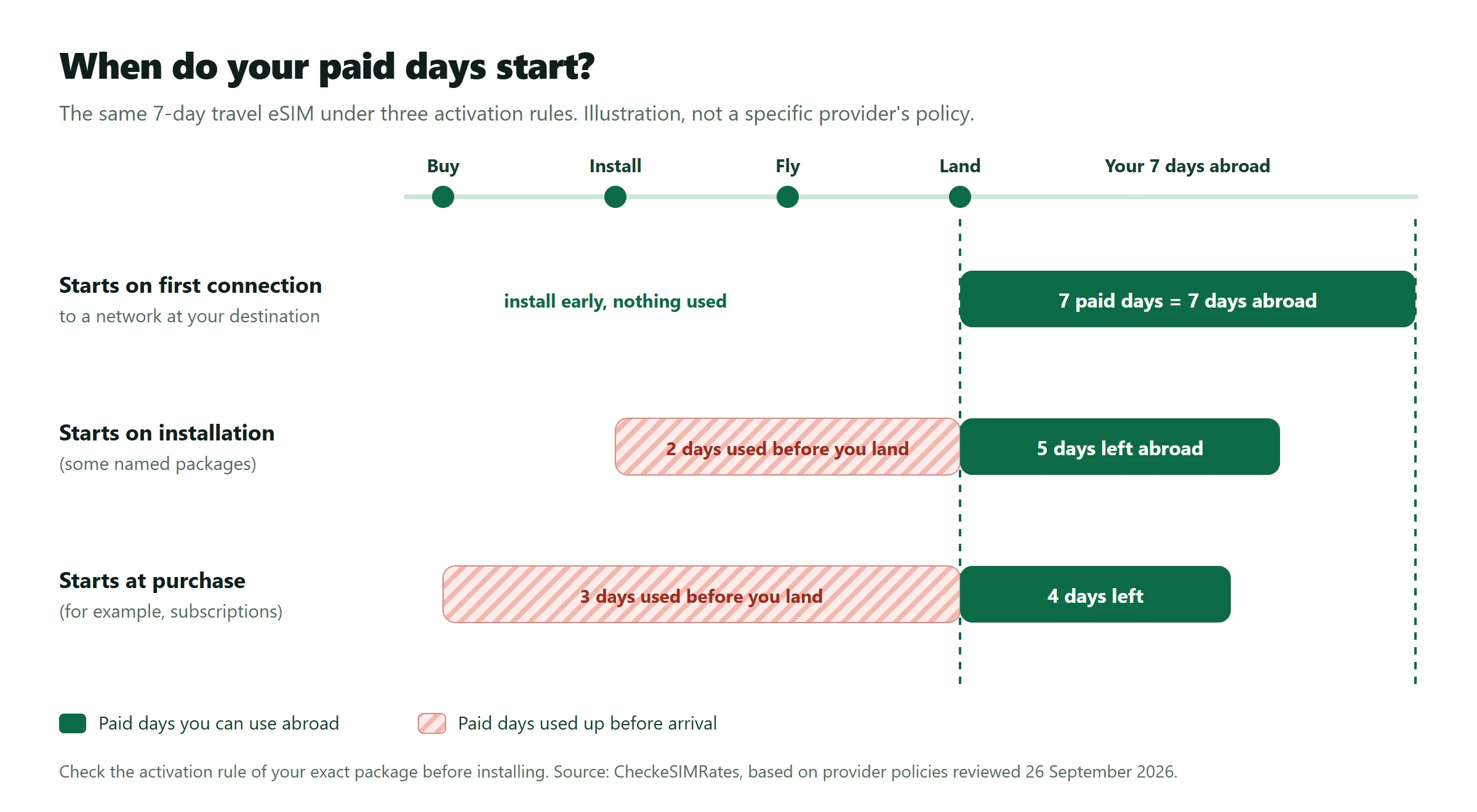
When should you install an eSIM before travelling?
Install before departure only when your package permits advance installation without an unwanted start to validity. Use a reliable internet connection and keep the provider’s instructions available offline.
Do not choose a universal rule such as “always install 24 hours before flying.” The useful question is whether the installation date changes the package’s expiry. If the policy is unclear, ask support: “Will installing this exact package today start my paid days?”
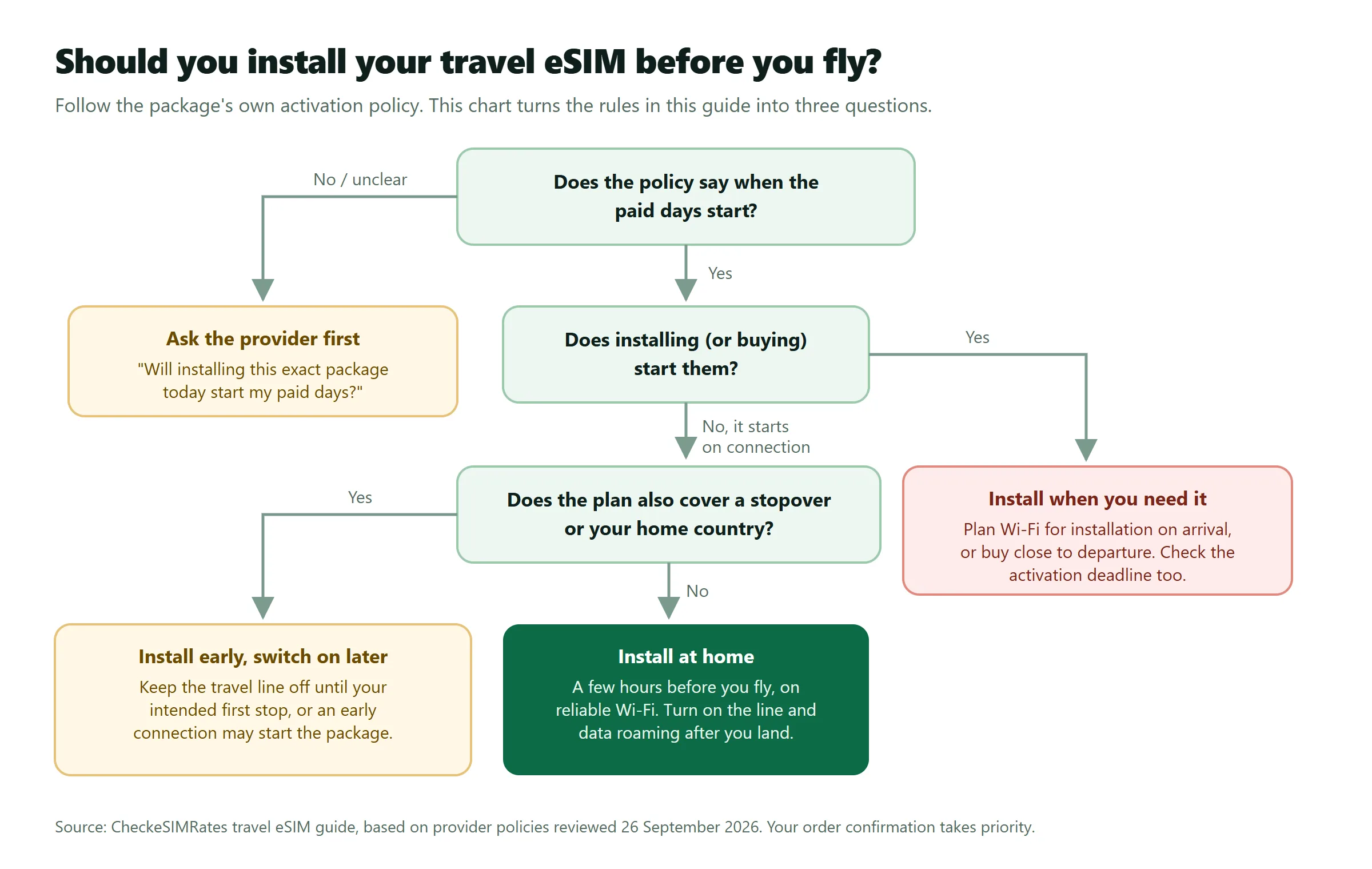
What do providers say about activation timing?
Provider policies differ, and exceptions can exist within one brand. As of September 2026, these official instructions illustrate why you should check the exact product.
| Provider or product | Published guidance | Important exception or check |
|---|---|---|
| Orange Travel | Recommends installation at home a few hours before travel, then activation at the destination with data roaming enabled. | Orange warns against deleting the eSIM if connection fails because it cannot be downloaded again. Orange installation and activation instructions. |
| Nomad | Describes destination-network activation for its general flow, with some packages requiring manual activation. | Its help page describes a typical 60-day activation window, a different expiry rule for Plum, and named Thailand packages that start on installation. Check the order email. Nomad activation rules and exceptions. |
| Holafly trip plans | Recommends advance installation and connection to a supported destination network when ready to use the plan. | Holafly distinguishes trip plans from subscriptions, whose timing can begin at purchase. Its guidance also flags regional coverage that includes your home country. Holafly timing and subscription guidance. |
Nomad’s named Thailand exceptions include its 50 GB / 10-day package and unlimited packages lasting 10, 15 or 30 days. Its instructions advise installation after arrival for those products. That exception should not be extended to every provider’s Thailand eSIM: when you compare Thailand eSIM plans, check each package’s own activation rule.
Can an eSIM activate during a layover?
A regional or global eSIM could meet its network-based activation condition before your final destination if an earlier stop is covered. Check the actual country list, not just the region’s name.
For example, a traveller using a regional plan may want connectivity during a stopover. Another traveller may prefer to preserve the package for the main trip. Decide which stop should be your first intended use, then follow the package’s activation instructions. Our regional eSIM comparisons are a starting point for checking multi-country options.
What should you do before departure and after landing?
Prepare the profile in advance when allowed, then complete the provider’s activation steps at your intended first use. Keep the following checklist with your travel documents.
- Check your exact device. Confirm eSIM support and that the phone can accept the selected provider.
- Read the starting condition. Save the activation policy, purchase deadline and any product-specific exception.
- Plan the allowance. Use our travel data planning guide before choosing the package.
- Install at the permitted time. Save setup instructions and support details while you have dependable internet.
- Label the lines clearly. Distinguish your home service from the travel eSIM before changing settings.
- Follow the arrival instructions. Select the intended data line and enable its roaming or manual activation only as instructed. Apple explains how to use eSIM while travelling with an iPhone, and Google how to choose the data SIM on a Pixel.
- Confirm the package status. Check the provider’s app or account for activation and expiry information, then test a small webpage.
Mobile data and your home-number service are separate decisions. Read our guide to travel eSIM calls and SMS before assuming the travel package replaces every service on your usual line.
Who should avoid installing an eSIM early?
Travellers with installation-triggered validity should avoid advance installation that consumes days they need abroad. Travellers with uncertain departure dates should also check activation deadlines before purchasing far ahead.
- Installation starts validity: arrange internet access for installation at the permitted time.
- A deadline is approaching: confirm what happens if the trip moves beyond that date.
- Home or transit coverage is included: check whether an early supported-network connection starts the package.
- The product is a subscription: check the billing start and renewal terms separately.
Frequently asked questions
My phone says the eSIM is active. Have my paid days started?
A phone’s line-status label is not sufficient proof that the package clock has started. Holafly explicitly distinguishes an installed or enabled profile from plan usage. Check the provider’s recorded package status and expiry instead.
Can I pause the plan by turning the eSIM off?
Do not assume that turning off the line pauses the package. Holafly states that its activated plan days continue running while the line is disabled. Ask your provider about the specific package rather than relying on the phone’s on/off switch.
Can I buy an eSIM months before travelling?
Only buy that far ahead after checking the latest permitted activation date and what happens after it. Nomad’s documented deadline is an example of why unused does not necessarily mean valid indefinitely.
Should I delete and reinstall an eSIM if activation fails?
Do not delete the profile as your first troubleshooting step. Orange Travel specifically warns that its eSIM cannot be downloaded again. Save the error message and contact the provider before removing the profile.
What if the plan instructions contradict a general help article?
Ask the provider to confirm the rule for your exact purchased package. Send the plan name, destination and intended travel dates, and request written confirmation of the event that starts validity.
Choose the plan first, then schedule activation
The right activation time depends on the package’s starting condition, not simply the flight date. Compare plans by destination, select an allowance and duration that fit your trip, then check installation timing, the activation deadline and expiry before paying.
How we researched this: CheckeSIMRates reviewed the three official provider help pages linked in the comparison table on 26 September 2026. This is a policy comparison, not a speed test or a claim that every package follows the same rules. Recheck the linked instructions and your order confirmation before installation.