

An eSIM is a digital SIM that lets a compatible device install a mobile plan without inserting a physical SIM card. This guide helps you check compatibility before paying. Once those checks pass, use our travel eSIM setup guide for installation.
Official guidance reviewed: 27 September 2026. Menu names can differ by software version and country. The model examples below are a starting point, not a worldwide guarantee for every device carrying the same name.
Key takeaways
- Check the exact model and purchase region, not just the phone family.
- An eSIM menu or EID does not establish that the phone is carrier-unlocked.
- Samsung and older Pixel models need particular attention to regional or carrier variants.
- Confirm your travel provider accepts the device before buying a non-refundable package.
How to check eSIM compatibility before buying
The most useful compatibility check combines evidence from the phone, its manufacturer and the intended provider. CheckeSIMRates recommends keeping these three decisions separate: device support, permission to use another carrier, and suitability of the travel package.
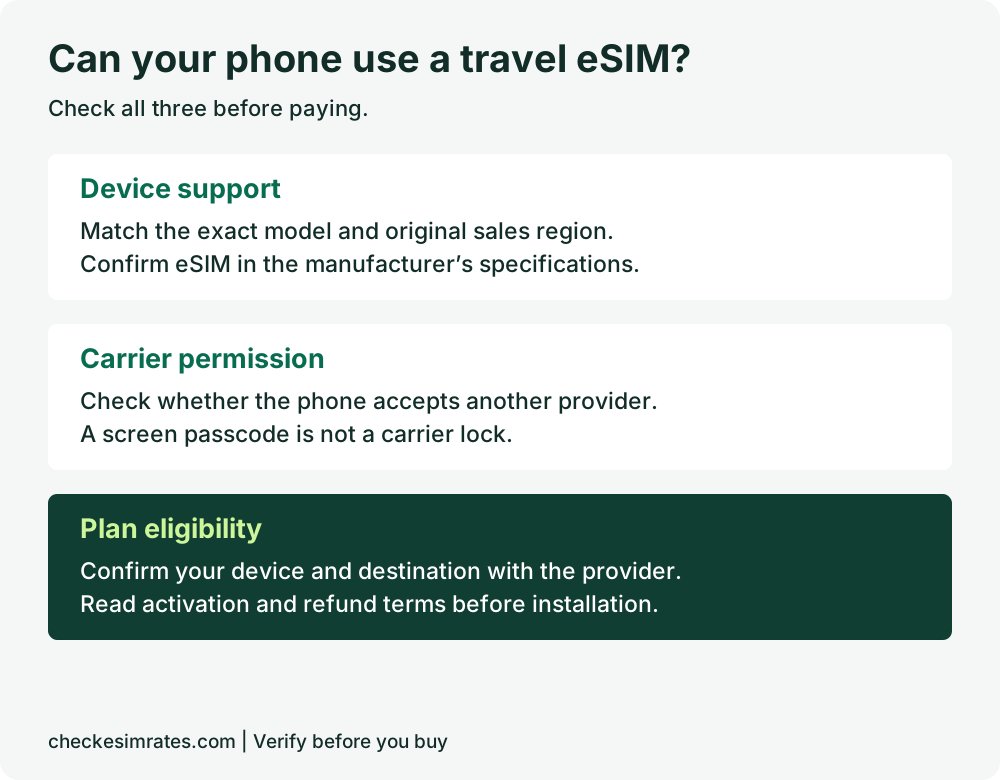
- Record the exact model. Open the phone’s About screen. Keep the model number and country of purchase, especially for imported or refurbished phones.
- Find the eSIM option. Look in the mobile-network or SIM settings using the brand instructions below. Do not purchase or install a plan just to check whether the menu exists.
- Match the manufacturer’s specifications. Use the support page for the country where the phone was sold. If the specification and menu disagree, ask the manufacturer to confirm the exact variant.
- Check carrier restrictions. Confirm that the phone can accept the provider you intend to use. Screen unlocking with a PIN or fingerprint is a different matter.
- Confirm the package. Check the provider’s device checker, destination coverage, activation rules and refund terms. Ask support before paying if any answer remains unclear.
Which phones support eSIM?
Many iPhones, Google Pixels and Samsung Galaxy devices support eSIM, but a brand-wide list cannot resolve every regional variant. Use this table to find the right verification path rather than treating it as a complete compatibility database.
| Phone family | Official starting point | Check before buying |
|---|---|---|
| Apple iPhone | Apple lists iPhone XS, XS Max, XR or later as its general starting requirement. | Regional model exceptions and carrier lock; do not interpret “or later” as universal support. |
| Google Pixel | Google lists Pixel 4 and later as eSIM-capable. | Carrier acceptance and package support; older Pixels have explicit restrictions. |
| Samsung Galaxy | Samsung’s Australian list includes selected S, Z, Note, A and XCover models. | Exact model code and sales region; the Australian list is not a global specification. |
| Other Android brands | Check the manufacturer’s specification for your exact model. | Do not infer support from Android version, price or a similar model name. |
How to check an iPhone
On iPhone, check eSIM support and carrier lock separately. Open Settings, then Cellular or Mobile Data, and look for Add eSIM or the equivalent setup option.
Apple’s official eSIM setup requirements identify the general model starting point and flag regional differences, including China mainland, Hong Kong and Macao. Check the current guidance for your exact variant instead of relying on a blanket claim that every recent iPhone supports every travel eSIM.
For carrier lock, open Settings → General → About → Carrier Lock. Apple’s confirmation wording is “No SIM restrictions”. If the phone is locked, contact the carrier: Apple says the carrier, not Apple, must unlock it. See Apple’s carrier-unlock instructions. Allow time before departure rather than assuming an unlock will be immediate.
How to check a Samsung Galaxy phone
On Samsung Galaxy, start in Settings → Connections → SIM manager or SIM card manager. Depending on the software, the installation option may be labelled Add eSIM or Add mobile plan.
Samsung explains that eSIM availability depends on model, region and carrier. A missing option needs investigation; repeatedly scanning a QR code is not a substitute for confirming support.
Samsung’s Australian compatibility guide includes examples such as Galaxy S24, S24 FE, A55 5G and A56 5G. It explicitly applies to Australian variants. For a phone bought elsewhere, open the relevant regional support page and find Embedded-SIM under its SIM specifications. Do not extend one country’s list to all phones worldwide.
How to check a Google Pixel
For a supported Google Pixel, open Settings → Network & internet → SIMs → Add SIM and look for Set up an eSIM. Google’s dual-SIM instructions also explain that simultaneous SIM use depends on the device and carrier.
Google’s Pixel compatibility guidance lists Pixel 4 and later as supporting eSIM. Pixel 3a phones bought with Verizon service or in Japan are excluded; Pixel 3 has additional carrier and country restrictions. Pixel 2 support is limited to devices bought with Google Fi service, while the original Pixel does not support eSIM.
For an older or second-hand Pixel, establish its original sales variant before purchasing a plan. The name on a marketplace listing may not contain enough information.
Does an EID prove a travel eSIM will work?
An EID identifies the eSIM component; it does not prove the phone is unlocked or accepted by a particular provider. Google says an eSIM requires an EID and shows Pixel users where to find it under About phone → SIM status in its phone identification guide.
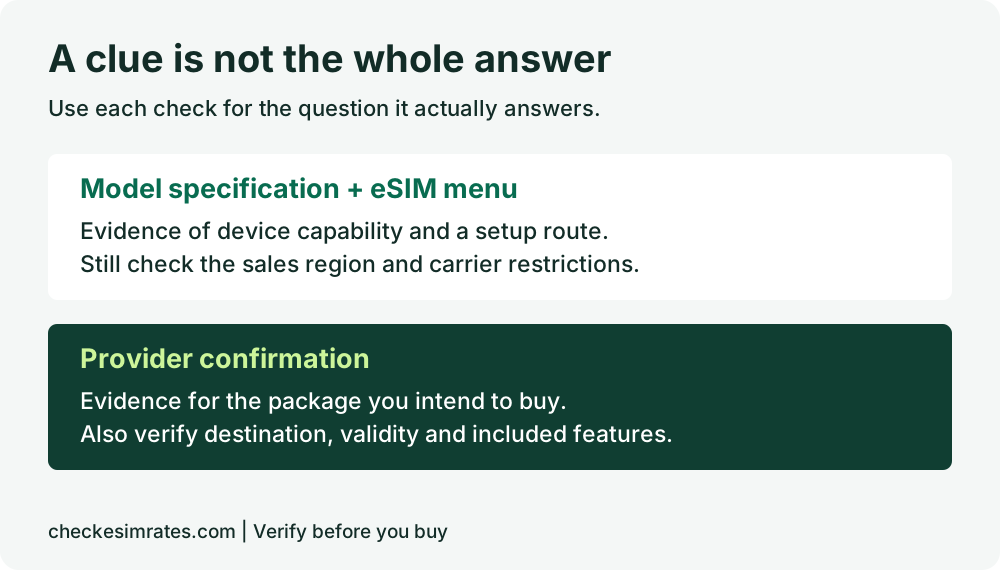
Use the manufacturer’s Settings instructions rather than making a universal rule from a dialler code. If you cannot find an EID, verify the model with official support. Avoid posting screenshots containing device identifiers publicly; share them only through the provider’s appropriate support channel when required.
What if Add eSIM is missing?
A missing Add eSIM option is a reason to pause the purchase and verify the device. It does not, by itself, tell you whether the cause is the model, regional software, a restriction or a different menu label.
| What you find | Next action |
|---|---|
| Manufacturer says the exact variant lacks eSIM | Consider a compatible physical SIM, an eligible roaming package or a separate hotspot. |
| Official specifications say eSIM is supported, but the menu is absent | Check manufacturer-recommended software updates and ask official support to investigate. |
| eSIM option exists, but the phone is carrier-locked | Ask the carrier whether the intended plan is allowed or an unlock is available. |
| Support is uncertain for an imported or refurbished phone | Send the exact model and original sales region to the manufacturer and intended provider before paying. |
What compatibility does not guarantee
A compatible phone does not establish a package’s coverage, speed, hotspot allowance or voice features. Treat device eligibility as the first purchase check, then compare what the plan actually includes.
Check calls and SMS availability if you need a phone number or ordinary mobile calls. Review when to activate your eSIM before installation, because the start of paid validity depends on the package.
Do not buy yet if the exact variant is unconfirmed, a carrier lock is unresolved, or the provider cannot confirm eligibility. A cheap plan is poor value if you cannot install or use it.
Frequently asked questions
Does dual SIM mean my phone supports eSIM?
No. Dual SIM describes support for two lines; it does not tell you whether those lines use physical SIM cards, eSIMs or a combination. Check the exact model’s SIM specifications.
Can a software update add eSIM to any phone?
No. Do not assume an update makes an unsupported model compatible. Updates can affect features on supported devices, but the manufacturer must confirm eSIM support for your exact phone.
Can I keep my home SIM while using a travel eSIM?
That depends on the phone’s supported SIM combination and carrier rules. Check how many lines can be active at once, then choose the intended data line and review your home carrier’s roaming charges.
Is a phone without a SIM tray automatically suitable?
No. The absence of a physical tray does not prove that an unrelated provider’s package is accepted. Confirm carrier restrictions and the travel provider’s device requirements.
Should I install a purchased eSIM just to test compatibility?
Read the package’s activation and refund terms first. Installation can have consequences for validity or refunds, so resolve compatibility questions with the provider before using the purchased installation code.
Check your phone, then compare your destination
Confirm the exact device, carrier restrictions and package eligibility before comparing prices. Once those checks pass, browse eSIM plans by destination and use our travel data planning guide to choose an allowance that fits your trip.
Research method: CheckeSIMRates reviewed the seven linked Apple, Google and Samsung support pages on 27 September 2026. This is a documentation-based buying checklist, not a hands-on test of every model or a guarantee from a provider. Manufacturer guidance and menu labels can change. We deliberately distinguish regional examples from worldwide eligibility.
Featured photo: Marcel R on Unsplash, used under the Unsplash License. Illustrative airport scene; no claim that the photographed phone was tested. Graphics: CheckeSIMRates.