

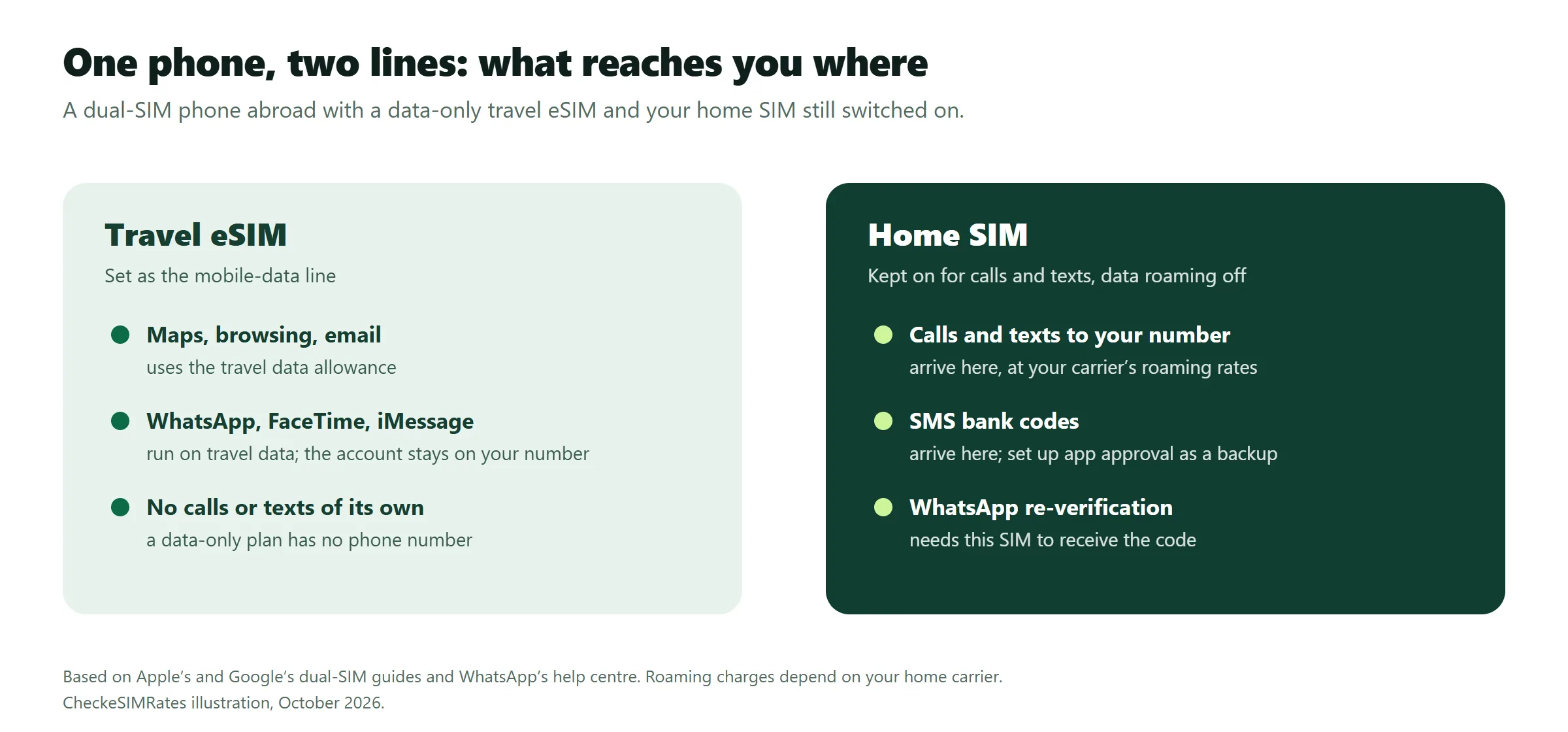
The two lines do different jobs. The travel eSIM gives you mobile internet for maps, browsing and chat apps; the home SIM keeps receiving whatever is sent to your usual number. Four settings do it, and the real risk is roaming charges on the home line, not losing your number.
Reviewed 21 October 2026 against the Apple, Google, WhatsApp and EU pages linked below. This guide explains settings and rules; it is not a test of SMS delivery on every network.
Does a travel eSIM change your phone number?
No. Installing a travel eSIM adds a second line to your phone; it does not replace or move your number. Most travel eSIMs are data-only and have no number of their own, so anything sent to your usual number still goes to your home SIM while that line is switched on.
If a number does appear next to the travel line in Settings, it belongs to the travel plan. Calls and texts sent to your home number never reach it.
| What you need | Which line handles it | What to check |
|---|---|---|
| Maps, browsing and apps | Travel eSIM, set as the data line | Data allowance; turn off automatic data switching |
| WhatsApp, FaceTime and iMessage | Travel eSIM data or Wi-Fi; the account stays on your home number | Re-verifying WhatsApp needs your home SIM |
| Calls and texts to your home number | Home SIM | Your carrier’s roaming rates for incoming calls and SMS |
| Bank codes sent by SMS | Home SIM | Set up app approval as a backup before you leave |
| Calling a local landline or business | Home SIM at roaming rates, or a plan that includes calls | Plans with calls and SMS compared |
How do you keep your home number on iPhone and Android?
Give each line one job: the travel eSIM gets mobile data, the home SIM keeps calls and texts. Both lines stay installed and switched on.
On iPhone
- Open Settings, then Cellular (Mobile Data or Mobile Service in some regions), and make sure both lines are turned on.
- Tap Cellular Data and choose the travel eSIM. Turn off Allow Cellular Data Switching, so the phone does not fall back to your home line’s data.
- Tap Default Voice Line and choose your home number.
- Open your home line and turn off Data Roaming. Turn on Data Roaming for the travel eSIM if its instructions say so.
On iOS 26 and later, the iPhone may offer to Turn On Travel eSIM when you land. If you choose to use both lines, data goes over the travel eSIM, but Apple notes that you might still incur roaming fees from your home line (Apple’s travel eSIM guide). Each setting is explained in Apple’s Dual SIM guide.
On Android
- On a Pixel, open Settings, then Network & internet, then SIMs, and make sure both SIMs are on.
- Choose the travel eSIM for mobile data.
- Choose your home SIM for calls and SMS.
- Open the home SIM and turn off Roaming; turn it on for the travel eSIM if its provider tells you to.
Other Android brands use different menu names, such as SIM manager. Google’s dual-SIM instructions show the Pixel steps, and which options appear depends on the phone and carrier.
Install the eSIM before you travel with our travel eSIM setup checklist, and check when to activate a travel eSIM so its paid days do not start early.
Should you turn off your home SIM abroad?
Not if you want calls and texts on your usual number. Keep the line on and turn off its data roaming, so it cannot use paid data in the background.
Turning off data roaming does not block chargeable calls and texts. Ask your carrier what incoming calls and SMS cost at your destination. Apple also warns that sending SMS or MMS attachments on the line that is not used for data can cost extra.
With an EU SIM inside the EU, receiving calls and texts costs nothing extra: calls, SMS and data are charged at domestic rates under the EU’s roam-like-at-home rules, which also cover Iceland, Liechtenstein, Norway, Moldova and Ukraine.
Turn the home line off only if you need no SMS at all, for example when your bank approves logins in its app. You can switch it back on when you need a code.
Can you receive texts with a data-only eSIM?
Not on the eSIM itself. A data-only line has no number, so nobody can send it an ordinary SMS, and it cannot send one.
Texts to your usual number still arrive on your home SIM while it is switched on and has signal, even though your data comes from the travel eSIM. Chat apps are different: iMessage, WhatsApp and similar apps send messages over the internet, so they work on the travel data or on Wi-Fi.
Apple says that even if you switch to the travel eSIM alone, FaceTime and iMessage keep working on your home number.
Does WhatsApp keep working with a travel eSIM?
Yes. WhatsApp stays linked to your existing number; the travel eSIM only supplies the data connection, so contacts reach you as usual. Do not register a new account.
The catch is verification. If WhatsApp asks you to re-verify, the code goes to your home number, and a data connection alone cannot receive it. WhatsApp’s help centre says you can keep using WhatsApp with your home number on a local SIM, but re-verifying the account needs the SIM card for that number.
A WhatsApp call also does not prove that your phone’s normal dialler can call a landline. Calls to ordinary numbers need a line with voice service, such as your home SIM at roaming rates.
Will bank verification codes reach you abroad?
A travel eSIM will not receive codes sent to your existing phone number. If your bank texts its code to your home number, keep that line reachable or use another verification method the bank supports.
A travel number with incoming SMS is no substitute. Banks text the number they have on file, so do not change your bank’s registered number to a temporary travel number.
- Check your bank’s supported sign-in and recovery methods before departure.
- If you will receive SMS on your home line, confirm overseas availability and charges with your carrier.
- If your bank offers app approval or another backup method, set it up while you still have normal access.
These are preparation checks; no setup guarantees that every bank or roaming network will deliver every message.
When do you need a travel eSIM with its own number?
Only when people or services must reach you the ordinary way at your destination: a landlord or tour operator who phones, a local service that sends an SMS, or local numbers you need to call without roaming charges.
Few travel eSIMs can do this. In our price data of 20 October 2026, at least 618 of the 63,916 plans we track (1.0%) listed calls or SMS, from five providers. Which ones, where, and what the extra costs is in eSIM with a phone number: plans with calls and SMS compared. Plans with a number are also the ones most likely to ask for ID or a passport.
Before you fly: six checks to stay reachable
- Roaming rates: ask your home carrier what incoming calls and SMS cost at your destination.
- Data line: the travel eSIM is installed and set for mobile data, with automatic data switching off.
- Home data roaming: off, with the home line itself left on.
- Wi-Fi Calling: on for the home line if your carrier supports it abroad; ask how those calls are billed.
- Bank backup: app approval or another supported sign-in method, set up while you still have normal access.
- WhatsApp: keep your home SIM active in the phone in case WhatsApp asks you to re-verify.
Two travellers on the same trip can need different setups. One only uses maps and family app calls and could switch the home line off; the other must receive texts at a home number and should keep it on.
Questions about keeping your number abroad
Will installing a travel eSIM change my phone number?
No. The travel eSIM is an extra line for data. Your number stays on your home SIM, and people reach you on it as before while that line is on.
Do I need to take out my physical SIM?
No. On a dual-SIM phone both lines stay installed, and you choose which one handles data, calls and texts. Keep the home SIM in place if you want texts to your usual number.
Can I receive texts on my home number while using travel data?
Yes, if the home line stays on and has signal. The travel eSIM does not receive texts addressed to your home number; check your carrier’s charges for receiving SMS abroad.
Will I pay to receive calls and texts abroad?
With an EU SIM in another EU or EEA country, no: roam-like-at-home rules mean no extra charge. Elsewhere it depends on your home carrier’s roaming terms, so check before you travel.
Can I call a hotel with a data-only eSIM?
Only through an internet app the hotel uses. Calling its ordinary phone number needs a line with voice service, such as your home SIM at roaming rates or a plan that includes calls.
Is an SMS-receiving travel number enough for bank verification?
Not necessarily. Banks text the number registered with them, usually your home number. Keep that line reachable and set up a backup sign-in method before travelling.
Choose the right connection for your trip
Start with your destination: browse travel eSIM plans by destination or compare Europe eSIM options. If you still need to pick a plan, read our guide to choosing an international travel eSIM; if you will share data with a laptop, check the hotspot and tethering rules.
Editorial method: We reviewed the Apple, Google, WhatsApp and EU pages linked beside the relevant claims on 21 October 2026; the plan count comes from our price database on 20 October 2026. This guide explains settings and rules; it is not a test of SMS delivery on every network. See how we compare plans for our methodology and affiliate disclosure.
Featured photo: David Geneugelijk on Unsplash. Used under the Unsplash License; an illustrative travel scene.